MEG Usage time
To see how much MEG usage time can be obtained ...
- via the IHR PC (Tank Room, G24) - not remotely!!
-
Open a terminal window (click on the Konsole Terminal button, lower left of the IHR window), then type ...
- megadmin@neptunus-20170801:/> cd /neuro/cryo/bin
The default Terminal window on the IHR now opens to ...
"megadmin@neptunus-20170801:/opt/neuromag/cryo/bin>"
so the above "cd (change directory)" may not be needed.- ./plot 7d --cycles - lists cryocooler state changes and times (85 => turn off, 80 => turn on)
- ./plot 7d --wins - plots windows (on top are the boil-off times, the same cooler-off times as with cycles.
See IHR Plot usage for other uses of the "plot" command.
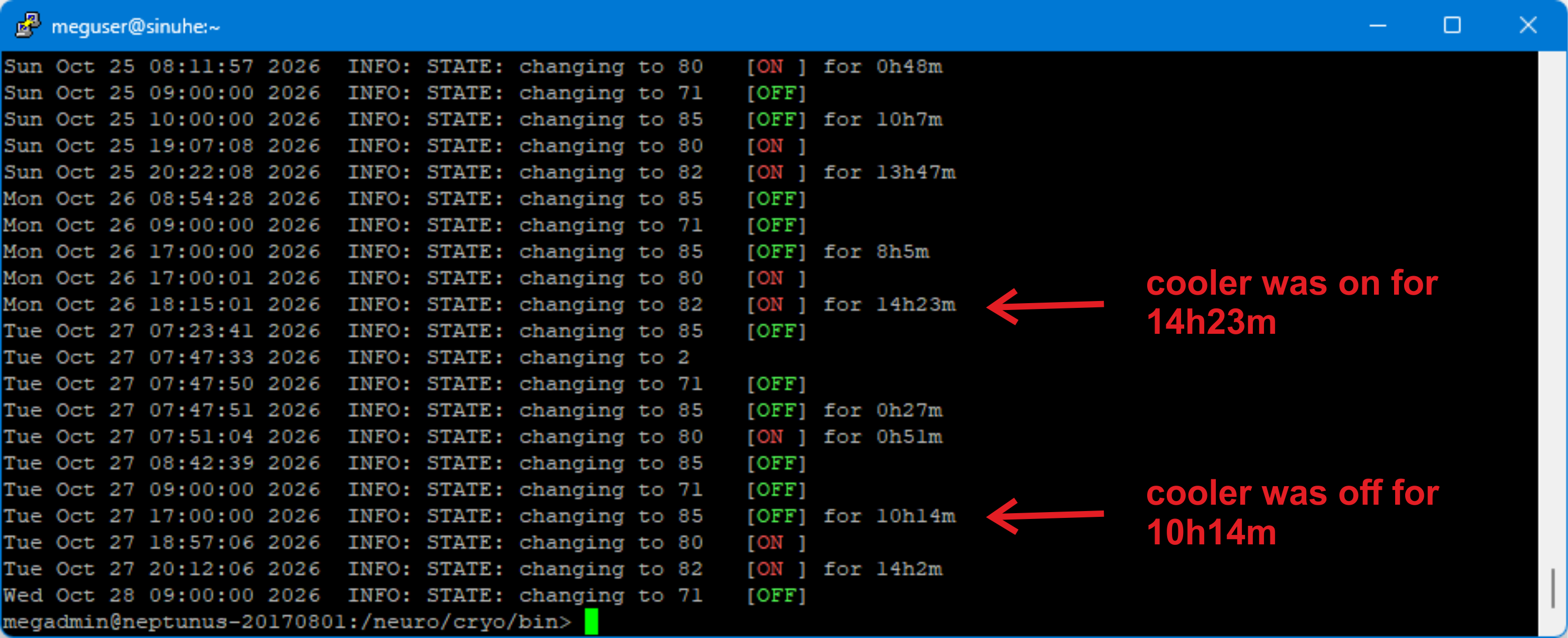 IHR Cycles
As the tanks only get half full during the day (~5bar), some extra capacity is achievable by letting the tank pressure accumulate Mon - Fri, so that the cryocooler can liquefy the full tanks over the weekend (or Sunday).
The extra capacity varies 1-2.5 hr/day, depending on the gantry position and cold head performance.
What to set the Scheduler to, if acquisition not taking place e.g. Sundays.
“Instead of using those "None" windows, nowadays we recommend to set the windows to their minimum length of 1 hour. The reason is that if you have multiple None days in a row, the system lets the tanks accumulate until 9 bars before starting to liquefy. Then if it happens that someone would happen to need the system earlier than expected, the tanks might get overfilled before the unexpected measurement finishes.”
Antti Teliö, 09/01/2020