Usual Problems, Probable Solutions
Probable solutions, for Holiday Cover (HC) personnel, to MEG IHR issues received via email and SMS text.
Error in cryocooler! Recycler is now in fail-safe mode
- The cryocooler compressor is not operating correctly. It is not safe for the internal helium recycler to continue operating. If the problem persists, helium loss will occur.
Unlikely to happen during normal working hours - unless liquefying during the day (Sleep Study ongoing, or emergency Cooldown) - so remote access/possible on-site visit is almost certainly required.
MEGIN may have already contaced HC personnel about the error, and already started a Measurement Window.
If not, then ...
-
Immediately start a Measurement Window [Off_Site_Procedure] to put the system into collection mode/helium boiling off into tanks. This may remove/stop the receiving of the “Error in cryocooler! ...” error message, but it won’t stop helium loss. Helium is still evacuating (horizontal line seen in IHR Tank pressure plot) but it will start helium collection into the tanks to reduce loss.
-
Now try to diagnose the error. Ring Security (ext. 0121 414 4444) to check if a Fire Alarm has shut down the building plant machinery/Chillers, so cooling water is not available. If no Fire Alarm, report the loss of cooling water to Security requesting that Estates be informed.
Abnormal liquefaction rate
- The helium level in the helium gas storage tanks is not decreasing expectedly.
Make sure that the probe unit is in the liquefaction position ("25"). Check the gantry position.
A liquefaction error, so unlikely to occur during normal working hours - unless liquefying during the day (Sleep Study ongoing, or emergency Cooldown).
- During the day, attend the MEG Lab and open the MSR. Check gantry/probe unit is at 25.
- Move the gantry up from 0, down from 68 or 60 as necessasy. Check traffic light is
flashing green - Adjust UP/DOWN buttons as necessary.
- Move the gantry up from 0, down from 68 or 60 as necessasy. Check traffic light is
- As per Tidying Up, the last Operator should haved moved the gantry/probe unit to 25 after use/at EoD.
- If at home, 'phone MEG Control Room (Information) - Operator could still be on-site.
- If no answer, follow [Off_Site_Procedure] to check gantry position.
- If gantry postion is incorrect, not 25 ...
DACQ: CONNECTED, STANDBY Gantry angle: 60- Email the last Operator (check Calpendo) to inform them of their need to return to the Lab to move the gantry to Liquefaction.
- If unable to contact them, email the Operators, Chbh-meg-operator[@]lists.bham.ac.uk, to query if anyone is on-site and able to move the gantry, or is willing to attend the Lab to do so.
- If none are willing, then an on-site visit will be required by HC to move the gantry to 25.
- Liquefaction rate normal again, will be reported by the IHR once gantry has been moved to the liquefaction position ("25").
Note
This check can only be performed locally, at the IHR PC in the Tank Room (G24), so an on-site visit will be required.
Occasionally, if the gantry hasn't been properly/securely moved to 25, after a short while the traffic light LED could change to solid green.
In this situation the IHR registers the gantry position as 68 (or sometimes a 4-figure number) when running the DACQ refresh command remotely - [Off_Site_Procedure].
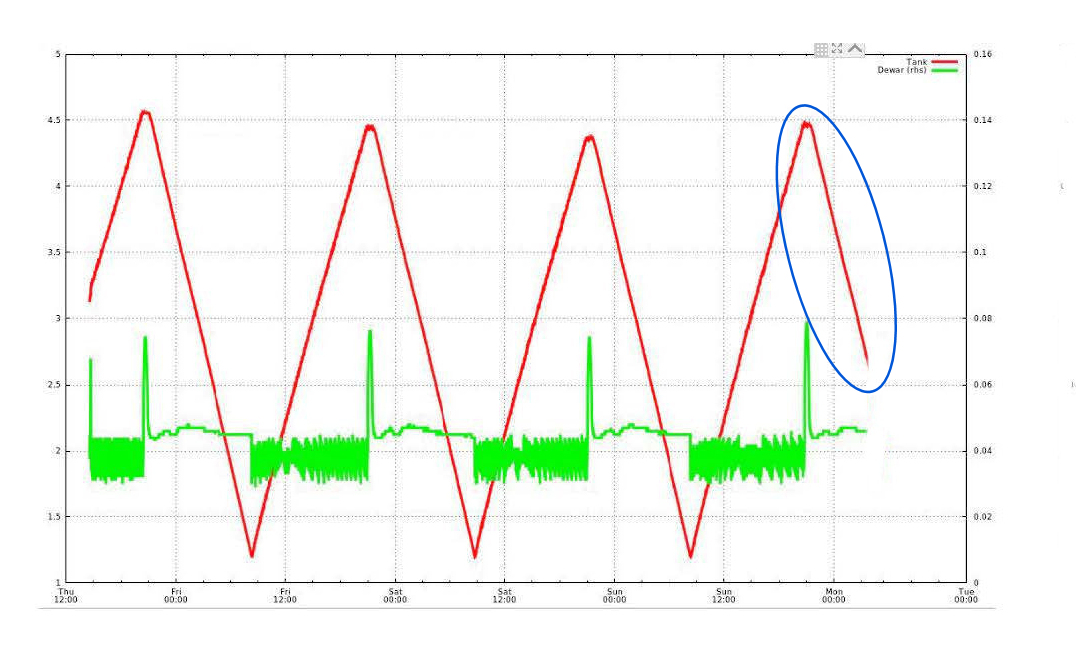
In order to be sure the gantry hasn't actually been left overnight in the incorrect Fully Upright (68) position (and liquefaction has been taking place for a few hours), select the History Plot icon, and examine the "Pressures" plot.
If the red Tank plot is showing its normal downward trajectory, like previous evenings with no issues, then the gantry is physically at 25 but has evidently shifted slightly triggering the solid green 68 indication.
De-metal, open the MSR, and press the UP/DOWN buttons to adjust the gantry back to
If gantry is left as is, "Abnormal Liquefaction" errors may occur as the IHR believes it is in the incorrect position, but liquefaction will continue down to 1.2bar at the normal rate. There may be some minor stop/start of liquefaction as the pressure nears 1.2bar.
Remind the Operators in the morning to always open the MSR before they leave, if end-of-day, to recheck the traffic light is
Link to DACQ workstation is down
- The control software cannot send notifications or detect the measurement schedule. Thus, the cryocooler can start in the middle of a MEG measurement and disturb the signal quality.
Check that the Console (DACQ, "Sinuhe") hasn't been shutdown by the current Operator, instead of the normal logging-out procedure as usual/at EoD.
- During the day, attend the MEG Lab and query the Operator as to the state they've left the DACQ.
- If they HAVE shutdown the DACQ, rather than logging off as normal, then ...
- Follow the Link to DACQ Workstation is down procedure, from MEG Troubleshooting.
- If the DACQ is still up, then the issue could be network-related.
- Check for any University-wide emails, or Teams messsages, from IT Services.
- Check the System Status page.
- Once any network issues are resolved, the IHR should send out the cleared message. If not received, a DACQ reboot might be required afterall - Link to DACQ Workstation is down
- If at home during the day, 'phone MEG Control Room [Information] to query the Operator as to the state of the DACQ.
- If necessary, have them follow the Link to DACQ Workstation is down procedure, and to inform of any issues seen.
- It may require an on-site visit by HC personnel to restart the DACQ ...
- If Acquisition is not running as expected (e.g. the Operator may report a Gantry Position error, as is not confident to fix it).
- If the Operator is not confident to run any required RAP or soft boot of the electronics.
- If the error has been received out-of-hours/overnight, due to an unexpected reboot.
- Link to DACQ workstation up again, is the cleared message reported by the IHR once DACQ communication has been reestablished.
Abnormal boil-off rate
- The helium boil-off rate is higher than expected, or abnormally low.
Unlikely to happen out-of-hours, only during daily usage.
The boil-off rate can temporarily rise if the probe unit position is changed repeatedly many times. In this case, the boiling rate typically returns to the normal level within 15-30 minutes.
- Attend the MEG Lab and query the current Operator about any unnecessary gantry changes.
- Examine the history plots on the IHR Console to see how the situation has developed re: previous Operator's usage.
The plots will provide clues - changes in boil-off rate (plotted pressure has a steeper or shallower slope than normal) - as to possible cause e.g. gantry left at Upright (60),
rather than being returned to Liquefaction (25) if there are a number of hours between the next acquisition session.
- Open a terminal window (click on the Konsole Terminal button, lower left of the IHR window), then type ...
- megadmin@neptunus-20170801:/opt/neuromag/cryo/bin> ./plot 7d --gantry
- gantry angle plots as blue squares, using the right-hand scale for position (25, 60, 68).
- Close the plot and re-run the command with more days, e.g. 14d, to see further back in time.
- Boil-off rate is normal again, is reported by the IHR once the situation is resolved e.g. gantry moved to 25.
The recycler is now on battery power
- The helium recycler cabinet has lost the line power. The UPS keeps the cabinet powered up for 5-30 minutes, but will then run out of battery.
Could happen at any time, day or night. Usually just a couple of seconds at most.
Indicates that the Internal Helium Recycler experienced a temporary loss of mains power, and switched to its backup battery as designed.
This could have been due to brief building power interruption or voltage dip, a momentary interruption to the circuit supplying the recycler, or a brief power supply glitch within the recycler itself.
If it was a single occurrence, then it's most likely just a brief, transient power interruption that the Internal Helium Recycler handled correctly.
If there are no further alarms, the recycler remains in normal operation, and this only happened once, it's usually not cause for concern.
- Save the resulting IHR email messages, which will note the date and time of the incident. If Estates reports a momentary power dip around the same time, that would explain it.
- If the pair of messages are seen repeatedly, e.g. several times a day or week, report it to Estates and/or MEGIN, as it could indicate an unstable Tank Room Mains power supply or a developing fault with the recycler's power input or UPS.
- Line power has been restored, is reported by the IHR once it detects that Mains power has been restored indicating the alarm condition has ended, and it has resumed normal operation.