Recovering responses via NAtA Interface
LxPad Operating Instructions February 2017 Rev.3
FO Connector - correct usage on how to remove.
CON-004 Converter Box PP pinouts
The MATLAB script below utilises the Psychtoolbox function KbQueue to record the responses of the 5- and 2-button NAtA Boxes.
It uses information taken from ...
and
http://psychtoolbox.org/docs/KbQueueCheck
The NAtA Response Boxes output button presses as Keyboard numbers via USB to the STIM PC.
The NAtA Converter box uses the US Keyboard layout, and since most modern keyboards have two ways to input a numerical value (standard row of numbered keys, and a number keypad) the correct key "name" needs to be implemented correctly in the Psychtoolbox code.
Note
This "naming" could also apply to Python/E-Prime/Presentation (citation needed).
Many thanks to Dr. Tjerk Gutteling for pointing this out.
5 Button      Keyboard number    [KbName ('xx')];

Left Little            1               1!
Left Ring              2               2@
Left Middle            3               3#
Left Index             4               4$
Left Thumb             5               5%

Right Thumb            6               6^
Right Index            7               7&
Right Middle           8               8*
Right Ring             9               9(
Right Little           0               0)

2 Button      Keyboard number    [KbName ('xx')];
(Could be either hand, left or right)

#1 L                   1               1!
#1 R                   2               2@

#2 L                   3               3#
#2 R                   4               4$
The NAtA Converter Box has TTL outputs to enable recording of button presses in MEG data.
STI102 channels In 9 to In 13 in the Stimulus Cabinet have been connected to Data Bit 0 to Data Bit 4 from the NAtA Converter box.
These 5 channels provide unique TTL combinations for all 10 buttons, according to the following ...
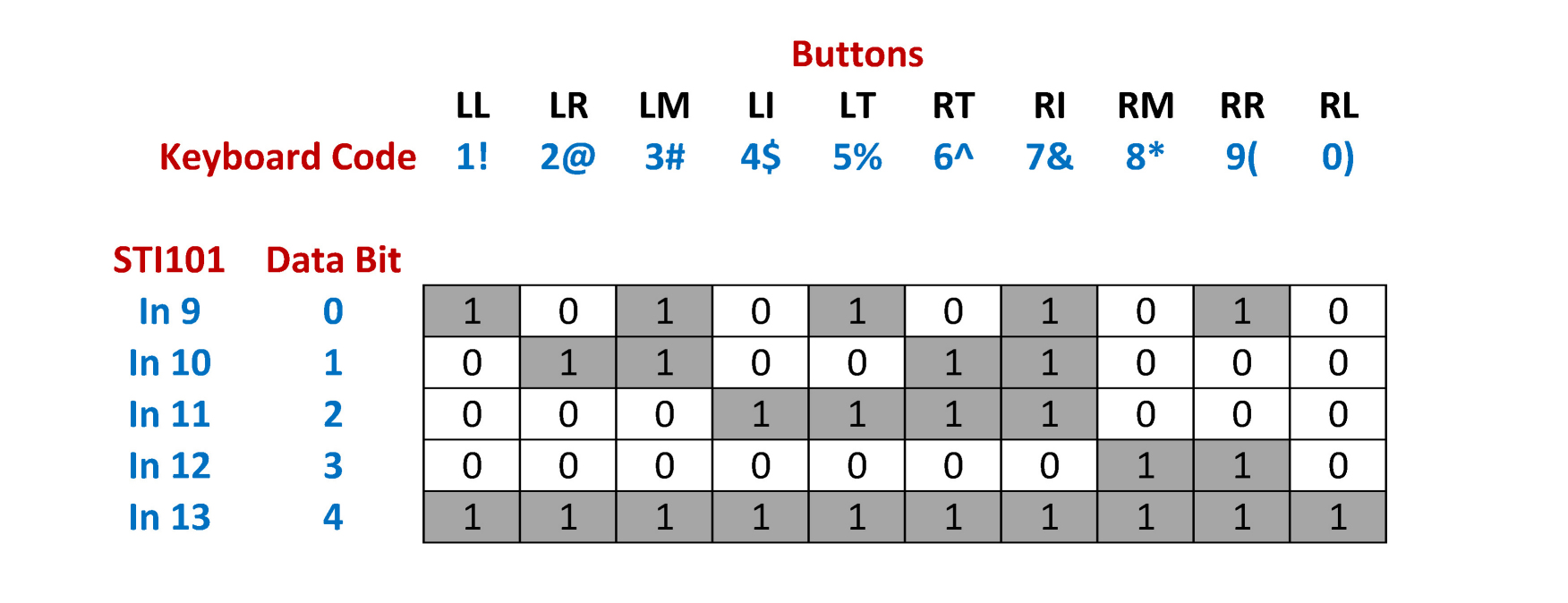
Select the relevant combination of the 5 channels in Acquisition Settings -> Channel selection to record the participant's responses.
August 2024
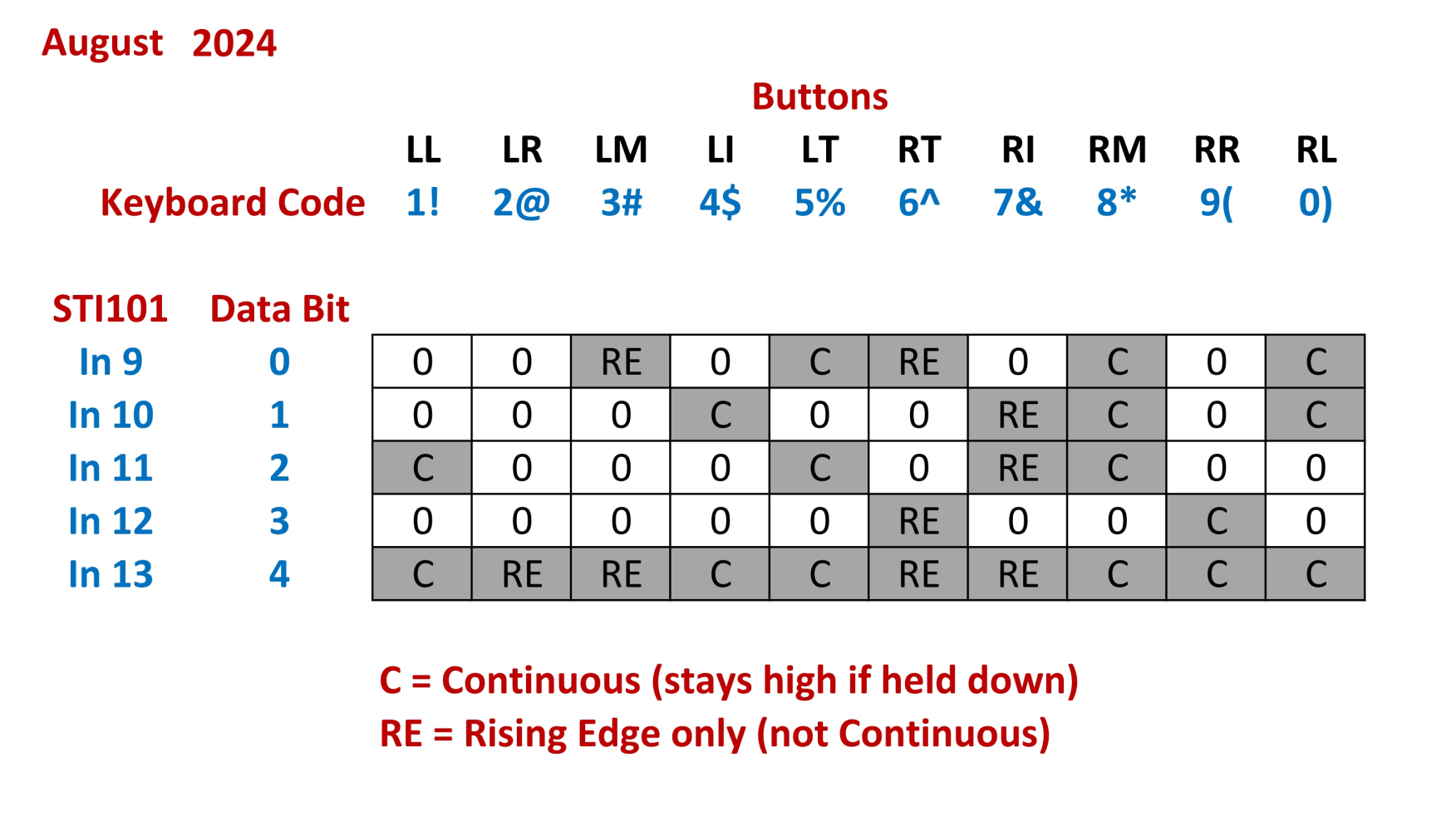
The original MEG Converter Box has been removed and the original buttons swapped to a new set (buttons set swapped again in October 2024), to allow the faulty "RR" button to be repaired or replaced.
The new buttons are non-sticky, and respond as before, LL => RL, 1 => 0
However, unfortunately the new Converter Box maps the button's parallel port outputs differently to the above, and not all buttons respond with a continuous press.
For now, use the following when deciding which button data bits to select in MEG Acquisition ...
NAtA_bbox.m
Many thanks to Dr. Tjerk Gutteling / Dagmar Fraser for providing the code
function [] = NAtA_bbox()

KbName('UnifyKeyNames'); % for easy use of Keyboard keys

activeKeysOnly=0; %If you want to listen only to specific keys, you can
device=0; %default device

if activeKeysOnly %here we listen only to specific keys
    active=[KbName('4$') KbName('7&')]; %These are the left and right index fingers of the (5-button) NATA boxes
    keylist=zeros(1,256); %Set all keys to zero (ignore)
    keylist(active)=1; %set active keys to 1 (listen)
    KbQueueCreate(device,keylist);%%Create queue, this is a time consuming operation (relatively), do while non-time critical
    disp('I will only listen to: ');disp(KbName(active));
else
    KbQueueCreate; %Default initialization, all keys listened to
end

noResponse=1; %While loop break

KbQueueStart(); %Start listening
startTime = GetSecs; %to get reaction times relative to some event (e.g. stimulus onset)

KbQueueFlush();% clear all keyboard presses so far. Basically, you want the responses after this point

%listen to reponses for a fixed amount of time, using KbQueueCheck (similar to KbCheck)
disp('Press some keys for the next 10 seconds..');
while noResponse

    [pressed, firstpress]=KbQueueCheck(); %check response, return whether pressed, and first press timestamp

    %Note that two keys may have been pressed
    keyCode=find(firstpress);

    if length(keyCode)>1 %two or more buttons pressed
        [~,ind]=min(firstpress(keyCode));
        keyCode = keyCode(ind); %select first response
    end

    t_keypress=firstpress(keyCode);

    if pressed
        %disp(['You pressed ' KbName(firstpress) ' ' num2str((firstpress(find(firstpress))-startTime)*1000) 'ms after start'])
        disp(['You pressed ' KbName(keyCode) ' ' num2str((t_keypress-startTime)*1000) 'ms after start'])
    end

    if (GetSecs-startTime)>10 %let's stop listening after 10 seconds
        noResponse=0;
    end

    WaitSecs(0.01); %no need to poll very tightly as responses are timestamped as they come in (unless you want something to happend right after the button press).

end

disp('Ok, I stopped listening.')

KbQueueFlush();% clear all keyboard presses so far. Basically, you want the responses after this point

%now wait for a response (similar to KbWait)
disp('Press a key to continue...')
KbQueueWait();

disp('Great, done!')

KbQueueRelease() %clean up the KbQueue, you need to re-create in order to use it again.


end